Click to earn websites...


Trillian 5.1.0.15c


Trillian is a fully featured, stand-alone, skinnable chat client that supports AIM, ICQ, MSN, Yahoo Messenger, and IRC. It provides capabilities not possible with original network clients, while supporting standard features such as audio chat, file transfers, group chats, chat rooms, buddy icons, multiple simultaneous connections to the same network, server-side contact importing, typing notification, direct connection (AIM), proxy support, encrypted messaging (AIM/ICQ), SMS support, and privacy settings.
Without stealing your home page and with no other included software, pop-ups, or spyware, Trillian provides unique functionality such as:
  • contact message history,
  • a powerful skinning language,
  • tabbed messaging,
  • global status changes (set all networks away at once),
  • Instant Lookup (automatic Wikipedia integration),
  • contact alerts,
  • an advanced automation system to trigger events based on anything happening in the client,
  • docking,
  • hundreds of emoticons,
  • emotisounds,
  • shell extensions for file transfers, and
  • systray notifications.
Download: Trillian 5.1.0.15c | (20.3 MB) Freeware

Credit: Razvan Mihai 

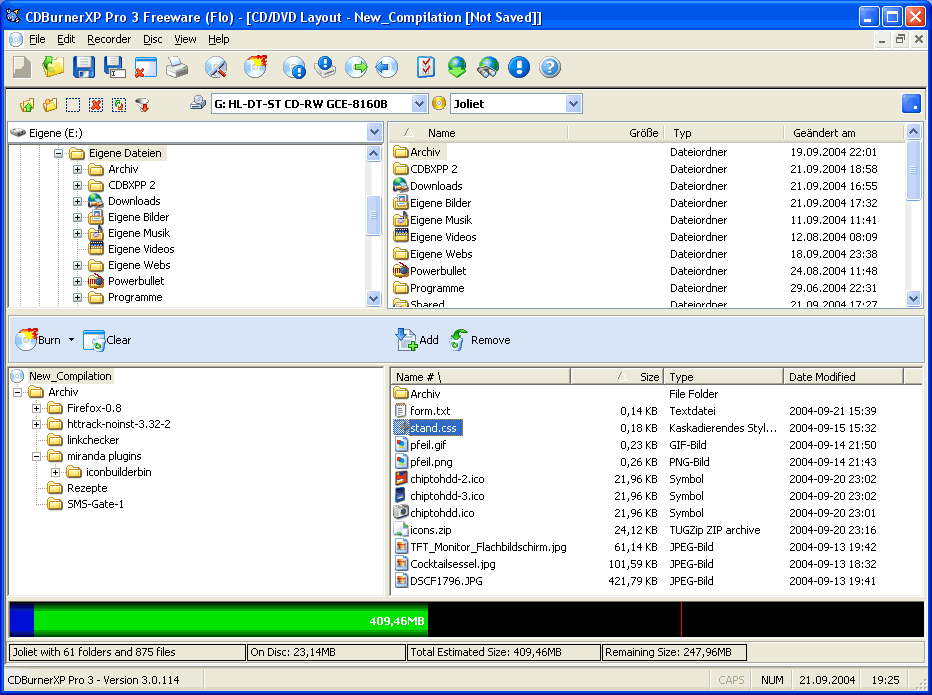
CDBurnerXP 4.3.9.2809


CDBurnerXP is a free application to burn CDs and DVDs, including Blu-Ray and HD-DVDs. It also includes the feature to burn and create ISOs, as well as a multilanguage interface. Everyone, even companies, can use it for free.
Key Features include:
  • burn all kinds of discs
  • audio-CDs with or without gaps between tracks
  • burn and create ISO files
  • data verification after burning process
  • create bootable discs
  • multi-language interface
  • bin/nrg to ISO converter, simple cover printing and much more!
  • Operating Systems: Windows 2000/XP/2003 Server/Vista/Windows 7
Changelog:
  • Disc spanning improved, number of copies for disc copying and better working (in regard to upgrades) MSI installer.
Note: Offers to install a 3rd party program that you can easily opt out of during install.

DownloadCDBurnerXP 4.3.9.2809 | 4.9 MB (Freeware)

credit: Razvan Mihai

WYSIWYG Web Builder 8.0


Web Builder  is a WYSIWYG (What-You-See-Is-What-You-Get) program used to create complete web sites. WYSIWYG means that the finished page will display exactly the way it was designed. The program generates HTML (HyperText Markup Language) tags while you point and click on desired functions; you can create a web page without learning HTML. Just drag and drop objects to the page position them 'anywhere' you want and when you're finished publish it to your web server (using the build in Publish tool). Web Builder gives you full control over the content and layout of your web pages. One Web Builder project file can hold multiple web pages.
WYSIWYG Web Builder features:
- No HTML knowledge needed!
- Drag and drop objects from the toolbox on the page: Text, Lines, Images, Marquees and Tables.
- Site Management. Easily add, edit, clone and structure your web pages from a single file.
- Customizable menus, toolbars, keyboard accelerators, dockable windows, tabs, autohide windows.
- Form layout object to create forms, including actions, hidden fields etc.
- Supports Form fields: Editbox, TextArea, Checkbox, Radiobutton, Combobox and Button.
- Rich text support: text object can contain different fonts, colors, links and sizes.
- Option to add custom HTML for each object (Before Tag, Inside Tag, After Tag).
- Custom HTML object to insert your own HTML or Javascripts.
- ActiveX, JAVA, Flash, Windows Media player, Quicktime, Real Audio and other Plug-In support.
- Publish your entire web site, a single page or a group of pages (to local drive or a web server) .
- Build-in Photo Gallery maker, with lots of cool features like picture frames!
- Rollover images.
- Bulleted Lists: Circle, Disc, Square, Numeric (1, 2, 3), Alpha (a, b, c) , Roman (I, II, III) and custom images.
- Image maps.
- Customize scrollbar colors for Microsoft Internet Explorer.
- Navigation bars.
- Ready-to-use Javascripts.
- Template support. Already more than 100 templates available!
- Support for Cascading Style Sheet positioning (layered layout).
- Insert Symbols (special characters).
- Verify links tool.
- Rotating Image component (useful for Ad Banners).
- Support for third-party add-ons, using the Web Builder Component Developers Kit.
- Import existing HTML pages.
- Hyperlink Style Sheet, to customize the colors/formatting of hyperlinks.
- Show optional rulers.
- Page transitions in Page Properties.
- Inline Frame component (IFRAME).
- Go menu: easily create a drop-down navigation menus.
- Menubar: powerful menu script that can mimic complex menus found in popular GUI applications.
- Shape object (Rectangle, Round rect, Ellipse, Diamond, Hexagon, Octagon, Parallelogram, Triangle, Trapezoid, Arrows, Flag, Flower, Heart, Signs, Stars, Talk Bubbles and much more!
- Embedded OLE component.
- Embedded page object. This allows you to re-use objects from other pages (master page concept).
What's new in this version:
  • WYSIWYG Web Builder 8.0 has more than 150 new features/improvements, full list of changes here.
Download: WYSIWYG Web Builder 8.0 |  6.9 MB (Shareware)

credit: Razvan Mihai

New Microsoft Security Essentials beta inbound

It looks like Microsoft is getting close to releasing a new version of Microsoft Security Essentials, as some Microsoft Connect participants are being invited to join a new Microsoft Security Essentials Public Beta program. Microsoft vaguely state that the newest MSE beta will have “the latest protection features”, and the beta program itself will “start soon” after you accept the invitation.

Apart from the fact that Microsoft is running a brand new beta program for MSE, we really have absolutely no other details. This is possibly for Microsoft Security Essentials version 3, as previously in June of last year Microsoft ran a beta program before releasing version 2 of the free antivirus software.
If you have been invited to join the Microsoft Security Essentials beta you will have received an email from Microsoft Connect. If not and you would like to join, you can try your luck over at the Microsoft Connect webpage. In the meantime, we await what the new MSE has in store.

Thanks to aznkid25 and Tech Greek for the tip in the forums!

Skype 5.x beta featuring Facebook to Facebook calling


Back in July, Facebook video calling powered by Skype was launched. Today we are thrilled to announce our partnership with Facebook has reached yet another milestone with the launch of Skype 5.4 Beta for Mac and Skype 5.7 Beta for Windows allowing you to conduct a Facebook-to-Facebook call from within Skype. This new development in the Skype-Facebook partnership is the latest example of how Skype is removing communication barriers and making it easier to connect with friends, family and business colleagues. Our approach to social is about personal connections with people. We are on a mission to connect over one billion people and our continued partnership with Facebook brings us one step closer to this goal.

Initiating a Facebook-to-Facebook call from within Skype is quite easy; all you need to do is connect your Skype and Facebook accounts. Then, select a Facebook friend and hit the video call button in Skype- your friend simply picks up the call from Facebook. This new feature lets you maintain social connections with your Facebook friends and compliments previously announced features such as being able to see when your Facebook friends are online, read their status updates and IM them all from Skype.

Besides this great new Facebook feature, additional new features added to Skype 5.4 Beta for Mac and Skype 5.7 Beta for Windows including video rendering giving a smoother video experience for Mac users and group screen sharing for Windows users with a Premium subscription (group screen sharing is currently available for Mac users). Users who are chatting one-on-one will also be able to screen share with live video streaming.

We're excited about these new enhancements and we would love for you to download the latest version of Skype so you can bring your social network to life with Skype. If you would like to discuss this new release or have any questions, please feel free to visit our new Skype Support Network.

Download: Skype 5.7 Beta (Windows) or Skype 5.4 Beta (Mac OS X)

uTorrent 3.0 Build 26473


µTorrent is an efficient and feature rich BitTorrent client for Windows sporting a very small footprint. It was designed to use as little CPU, memory and space as possible while offering all the functionality expected from advanced clients.
Micro-Sized Yet Feature Filled

Most of the features present in other BitTorrent clients are present in µTorrent, including bandwidth prioritization, scheduling, RSS auto-downloading and Mainline DHT (compatible with BitComet). Additionally, µTorrent supports the Protocol Encryption joint specification (compatible with Azureus 2.4.0.0 and above, BitComet 0.63 and above) and peer exchange.

Resource-Friendly
µTorrent was written with efficiency in mind. Unlike many torrent clients, it does not hog valuable system resources - typically using less than 6MB of memory, allowing you to use the computer as if it weren't there at all. Additionally, the program itself is contained within a single executable less than 220 KB in size.

Skinnable and Localized
Various icon, toolbar graphic and status icon replacements are available, and creating your own is very simple. µTorrent also has support for localization, and with a language file present, will automatically switch to your system language. If your language isn't available, you can easily add your own, or edit other existing translations to improve them!

Actively Developed and Improved
The developer puts in a lot of time working on features and making things more user-friendly. Releases only come out when they're ready, with no schedule pressures, so the few bugs that appear are quickly addressed and fixed.
What's new in this release:
  • Fix: fixed incorrect teredo MTU assumption
  • Fix: fix bug where the rating was not bound-checked in the comments tab
Download: uTorrent 3.0 Build 26473 | 627 KB Freeware

VMware Player 4.0.1 Build 528992


VMware Player is the easiest way to run multiple operating systems at the same time on your computer. With its user-friendly interface, VMware Player makes it effortless for anyone to try out Windows 7, Chrome OS or the latest Linux releases, or to create virtual "sandboxes" to test pre-release software in. VMware Player can also be used to run a virtual copy of an old PC so that you can recycle the old machines you have under your desk or stored in the closet.
  • Run multiple operating systems simultaneously on a single computer
  • Experience the benefits of preconfigured products without any installation or configuration hassles
  • Share data between host computer and virtual machine
  • Run 32- and 64-bit virtual machines
  • Use 3rd-party pre-configured virtual machines and images
  • Share data between the host computer and virtual machine
  • Broad host and guest operating system support
  • Support for USB 2.0 devices
  • Gain easy access to virtual machines via an intuitive home page interface
Download: VMware Player 4.0.1 Build 528992 | 117 MB (Freeware, registration required)