Click to earn websites...


Showing posts with label Anti Spyware. Show all posts

Comodo Cleaning Essentials 2.3.219500.176

Comodo Cleaning Essentials (CCE) is a set of powerful security tools designed to help users identify and remove malware and unsafe processes from Windows computers. Designed as a portable application, the software requires no installation and can be run directly from removable media such as a USB key.
CCE consists of two core technologies:

  • KillSwitch - an advanced system monitoring tool that allows users to identify, monitor and stop potentially unsafe processes that are running on endpoint systems. Uniquely for a product of its type, KillSwitch leverages Comodo's huge whitelist database to isolate untrusted processes with an extremely high degree of accuracy – improving IT operational efficiency by reducing false positives and cutting the amount of time spent troubleshooting an endpoint machine.
  • Malware scanner – fully featured malware scanner capable of unearthing and removing viruses, rootkits, hidden files and malicious registry keys hidden deep within a system. The scanner is highly configurable, uses the latest heuristic techniques to detect previously unknown viruses, features first-class malware removal capabilities and is capable of detecting hidden drivers and services loaded during system start-up.
Features:
  • Classifies the threat level of all objects and processes currently loaded into memory and highlights those that are not trusted
  • Allows the admin to terminate, delete or suspend every untrusted item with a single click.
  • On-demand malware scanner quickly finds viruses, rootkits and hidden services
  • Extremely efficient malware removal routines thoroughly disinfect virus stricken endpoints
  • Detailed statistics and graphs allow admins to analyze and fine tune system activity to almost infinite levels of detail
  • Leverages Comodo's huge whitelist database to accurately identify the trust status of every running process with minimal false positives
  • Integration with Comodo cloud scanning technology delivers instant behavioral analysis of unknown processes
  • Powerful system tools provide control over even the most obscure system settings
  • Simple interface for admins to manage trusted vendors list
  • Comprehensive event logs provide detailed overview of system activity on endpoint machines
  • Quick repair feature allows fast restoration of important Windows settings
  • Can replace the standard Windows Task Manager if required
  • Another indispensable addition to admin's security toolkit to complement software such as Comodo Internet Security
  • Lightweight – requires no installation and can be run right from a USB stick
  • Fast, free and easy to use
Download: Comodo Cleaning Essentials 32-bit | (22.7 MB) Freeware
Download: Comodo Cleaning Essentials 64-bit | (24.4 MB) Freeware
 

Avira AntiVir Personal 12.0.0.872


Avira AntiVir Personal - FREE Antivirus is a reliable free antivirus solution, that constantly and rapidly scans your computer for malicious programs such as viruses, Trojans, backdoor programs, hoaxes, worms, dialers etc. Monitors every action executed by the user or the operating system and reacts promptly when a malicious program is detected.
Avira AntiVir 12.0 Highlights:

More intuitive User Interfaces – A cleaner, more modern screen design with options organized by function, and a streamlined 2-click install process and automatic resolution of software conflicts during installation. Avira’s software was designed with default configurations to make installation easier, to keep the user safer, and to take the guesswork out of remaining secure. Also, users will discover that many components have been renamed so that every consumer can understand their function without reading the documentation. And best of all, a one-click “Fix Problems” button to solve any issues that might endanger users’ computers.

Smarter Code – Avira software has even further increased detection rates by out-witting malware that hides from ordinary antivirus software. New detection mechanisms find rogue code that hides even deep in the operating system.

Stronger Detection – All components have been fortified in order to better resist malware attacks that target antivirus software specifically. This fortification includes the ability for Avira software to function without many registry keys, better resistance against process termination and component deletion, and many other malware counter-measures.

In addition to a simpler interface, smarter code, and stronger detection, Avira 2012 also focuses on support by adding Live Customer Support for all premium products. If users run into any problems, they can connect directly with a technical support engineer who will fix the problems in real time over the Internet using Avira’s new Team Viewer feature.

Lastly, running two security solutions in parallel can have negative consequences on the stability of the PC and the overall experience with newly installed software. So in order to make the transition to the Avira products version 2012 as easy and painless as possible, automatic detection and removal of potentially incompatible software has been added in all installation programs. No worries, it is possible to select what 3rd party solutions to keep.
  • Detects and removes more than 150,000 viruses
  • Always among the winners of comparison test featured in computer journals
  • The resident Virus Guard serves to monitor file movements automatically, e.g. downloading of data from the internet
  • Scanning and repair of macro viruses
  • Protection against previously unknown macro viruses
  • Protection against trojans, worms, backdoors, jokes and other harmful programs
  • AntiVir protection against viruses, worms and Trojans
  • AntiDialer protection against expensive dialers
  • AntiRootkit protection against hidden rootkits
  • AntiPhishing protection against phishing
  • AntiSpyware protection against spyware and adware
  • NetbookSupport for laptops with low resolution
  • QuickRemoval eliminates viruses at the push of a button
  • Easy operation
  • Internet-Update Wizard for easy updating
  • Protection against previously unknown boot record viruses and master boot record viruses
Download: Avira AntiVir Personal 12.0.0.872 | 83.0 MB (Freeware, non commercial use)
View: AntiVir Website for Product Information

credit: Razvan

SUPERAntiSpyware 5.0.1142


SUPERAntiSpyware Free Edition is 100% Free and will detect and remove thousands of Spyware, Adware, Malware, Trojans, KeyLoggers, Dialers, Hijackers, and Worms. SUPERAntiSpyware features many unique and powerful technologies and removes spyware threats that other applications fail to remove. Easily remove pests such as WinFixer, SpyAxe, SpyFalcon, and thousands more. Repair broken Internet Connections, Desktops, Registry Editing and more with our unique Repair System. Dedicated Threat Research Team scours the web for new threats and provides daily definition updates.

UPERAntiSpyware Free Edition does not include real-time blocking or scheduled scanning. Download 

setup: SUPERAntiSpyware 5.0.1142 Free | 13.0 MB (Freeware)
Download portable: SUPERAntiSpyware 5.0.1142 | 17.8 MB

credit: Razvan Azmanov

Kaizer Killer The Remover

***Note: Viruses that this removal can treat are not all specified..
If on the first time to run this application and doesn't remove any viruses/malicious script, run it once again.


***Please support Kaizer Killer, just free to contactd us, and inform
us bout the latest virus that you've encountered and you wish to be added in the virus list of Kaizer Killer. Thank You!.


Here are some viruses it can remove:

1. $lddata$ removal
2. __.* remover
3. _defau~1.pif removal
4. _exp1orer.exe remover
5. _istmpi.dir removal
6. _noteped.exe remover
7. _sv_cmd_ removal
8. 111.exe remover
9. 3g08.bat removal
10. 3wcxx91.cmd remover
11. 8ng8w.com removal
12. 8ot8y86.exe remover
13. 8u.com removal
14. ac12594 remover
15. Ad22098 removal
16. adober.exe remover
17. aikelyu.html removal
18. alecks.* remover
19. amvo.exe removal
20. amvo0.dll remover
21. amvo1.dll removal
22. an16554 remover
23. autorun.* removal
24. avpo*.* remover
25. awkeygen.exe removal
26. azkaban.* remover
27. bacabr~1.txt removal
28. bar311.exe remover
29. blastcln.exe removal
30. blastclnnn.exe remover
31. boot.exe removal
32. ccprxy.exe remover
33. copy.exe removal
34. crss.exe remover
35. ctfmon.exe removal
36. d.com remover
37. mdm.exe removal
38. desktop.exe remover
39. desktop.ini removal
40. destrukto.* remover
41. destrukto.vbs removal
42. dismgnt.exe remover
43. dllhost.com removal
44. dnscon70.dll remover
45. dv6191~1 removal
46. dv6211~1 remover
47. dv6333~1 removal
48. exiplorer.exe remover
49. exp1orer.exe removal
50. explorar.vbs remover
51. explorer.exe removal
52. explorer.vbs remover
53. folder.htt removal
54. FS6519.dll.vbs remover
55. Funny UST Scandal.avi.exe removal
56. funnyu~1.exe remover
57. g2p3s.exe removal
58. gwe(i~1.exe remover
59. h.cmd removal
60. h2.com remover
61. homepage.html removal
62. host.exe remover
63. ie.exe removal
64. iexp1ore.exe remover
65. iloveher.exe removal
66. imgkulot.* remover
67. infrom.dat removal
68. infrom.exe remover
69. intern~1.lnk removal
70. isass.exe remover
71. j6154022.exe removal
72. j6154022.exe remover
73. jalak-~1.com removal
74. jay.exe remover
75. jaymeyka.wen9.com removal
76. kavo.exe remover
77. kavo0.dll removal
78. kavo1.dll remover
79. kernel~1.vbs removal
80. kernell.dll.vbs remover
81. killer.exe removal
82. knight.exe remover
83. krag.exe removal
84. kragdor.log remover
85. kulitut.* removal
86. ld.exe remover
87. ldjs.txt removal
88. ldlist.txt remover
89. ldup.exe removal
90. ldupver.txt remover
91. lsass.exe removal
92. lsasse~1.exe remover
93. maskrider2001.vbs removal
94. mdm.exe remover
95. mgrShell.exe removal
96. mma.bat remover
97. mma.reg removal
98. mma.vbs remover
99. ms.config removal
100. ms.config`.exe remover
101. ms32dll.dll.vbs removal
102. MS32DLL.dll.vbs remover
103. ms-dos removal
104. msinfo remover
105. msrm removal
106. mstcpcon20.dll remover
107. msvcr71.dll removal
108. mswinsck.ocx remover
109. mveo.exe removal
110. myfold~1.com remover
111. n1deiect.com removal
112. n2847 remover
113. n5619 removal
114. n8127 remover
115. netmanage.dll removal
116. netsvcs.exe remover
117. netused.dll removal
118. new document.exe remover
119. new folder.exe removal
120. newdoc~1.exe remover
121. newfol~1.exe removal
122. noteped.exe remover
123. nt.config removal
124. ntde1ect.com remover
125. ntkros.dll removal
126. ntsys.exe remover
127. o4154027.exe removal
128. ofcpfwsvcs.exe remover
129. p3r1ud.exe removal
130. passwo~1.exe remover
131. Password:winzip123 removal
132. password_viewer.exe remover
133. pc-off.bat removal
134. pet32.exe remover
135. photos.zip.exe removal
136. photos~1.exe remover
137. poogs.vbs removal
138. pooh.vbs remover
139. ratedr~1.com removal
140. ravmone.exe remover
141. ravmonlog removal
142. recycled remover
143. recycler removal
144. recycler.exe remover
145. redelbat.bat removal
146. rm remover
147. rootfo~1.com removal
148. S2pidwaraynon.html remover
149. s5421 removal
150. s6939 remover
151. s8787 removal
152. Say No To Drugs - iloveher.exe remover
153. scvhost.exe removal
154. scvhosts.exe remover
155. scvhsot.exe removal
156. scvshosts.exe remover
157. scvvhsot.exe removal
158. SecretStub.exe remover
159. sender.vbs removal
160. setting.ini remover
161. setup removal
162. setup.exe remover
163. sexvid~1.exe removal
164. silent~1.exe remover
165. SilentSoftecth.exe removal
166. smss.exe remover
167. spoclsv.exe removal
168. sqlserv.exe remover
169. sscvihost.exe removal
170. sscviihost.exe remover
171. ssvichosst.exe removal
172. startu~1.com remover
173. svchosl.exe removal
174. svchost.ini remover
175. svchost32.exe removal
176. svhost.exe remover
177. svhost32.exe removal
178. svohost.exe remover
179. svshost.exe removal
180. sxs.exe remover
181. sy.exe removal
182. SY20118 remover
183. t.exe removal
184. test.* remover
185. ttms*.dll.vbs removal
186. ugqe
187. VBS_SOLOW.A (Taga Lipa Are, Taga Xpress-On Kami, Taga Eti, Marinduque Mabuhay, Malaysian, Hackers, Protected by CPCT, Hacked by-Godzilla, M00zilla, YaHaa,"Your Firewall is Fuck", Zay, UC).
188. vhost.exe removal
189. wincab.sys remover
190. winconfig.dll.vbs removal
191. winkrnl.exe remover
192. winlogon.exe removal
193. winscok.dll remover
194. wintask.exe removal
195. wmiprvse.exe remover
196. WORM_ONLINEG.TCZ (q83iwmgf.bat) removal
197. wscript.exe remover
198. wsctf.exe removal
199. wvcst.* remover
200. x.com removal
201. x264~1.exe remover
202. xn1i9x.com removal
203. ymworm.exe remover
204. zelurm~1.exe removal
205. zllictbl.dat remover

thank your for the maker of tool...GIGZ.

<a href="http://64032780.linkbucks.com"> Download Here </a>

Kingsoft PC Doctor 3.1.1.65


Kingsoft Security has updated his powerful computer security suite which intensively can scan, detect and remove malware, using Kingsoft Cloud Security Engine and Kingsoft V10 Antivirus Engine, patch Windows vulnerabilities, clean junk files and optimize Windows performance. While this might all sound  familiar, thanks to the abundance of cheap one-click optimizers, Kingsoft PC Doctor is an entirely different program.
Anti-Trojan: Anti-Trojan function of the Kingsoft PC Doctor exploits both the revolutionary Cloud Security Engine and powerful V10 Antivirus Engine on local device which are presented by Kingsoft Security to defense billions of malicious Trojan viruses program away from your computer.

Windows Vulnerability Repair: Repair function of the Kingsoft PC Doctor provides computer users overall and intensive Windows OS vulnerability scan service and, support the users patch such vulnerability in fast and easy-to-use operation. Meanwhile, the Windows Vulnerability Repair function presents advanced performance on Microsoft Windows 7 OS.

Windows Cleaner: Cleaner is a powerful function of the Kingsoft PC Doctor which is designed for cleaning Windows OS unused files and temporary files, erasing traces of online activities and Internet history, and cleaning Windows register. Users can execute One-Click function to run the Cleaner to free up valuable computer hard disk space.
System Repair: System Repair is an useful function of the Kingsoft PC Doctor which is designed for scan abnormal option of the Windows Operating System and, provide professional and fast repair service to computer users.

Trace Cleaning: Trace Cleaning is a powerful function which is designed for erasing traces of online activities, local computer operating behavior history and, Internet history. This function is located under the Cleaner option of the Kingsoft PC Doctor.

Plug-in Cleaning: Plug-in Cleaning function of the Kingsoft PC Doctor is a powerful suspicious plug-in application cleaner program. This function is located at the option of Anti-Trojan and, serve computer users to clean suspicious plug-in application and, defense potential security threats away.
My Startup - Detailed Startup Time: As a newly added feature, "My Startup" displays the detailed startup time of user's PC. Are you still troubling with the slow startup? This useful feature can tell you the reason of your slow startup.

Download: Kingsoft PC Doctor 3.1.1.65 | 15.3 MB (Freeware)

credit to: Razvan Mihai

New Microsoft Security Essentials beta inbound

It looks like Microsoft is getting close to releasing a new version of Microsoft Security Essentials, as some Microsoft Connect participants are being invited to join a new Microsoft Security Essentials Public Beta program. Microsoft vaguely state that the newest MSE beta will have “the latest protection features”, and the beta program itself will “start soon” after you accept the invitation.

Apart from the fact that Microsoft is running a brand new beta program for MSE, we really have absolutely no other details. This is possibly for Microsoft Security Essentials version 3, as previously in June of last year Microsoft ran a beta program before releasing version 2 of the free antivirus software.
If you have been invited to join the Microsoft Security Essentials beta you will have received an email from Microsoft Connect. If not and you would like to join, you can try your luck over at the Microsoft Connect webpage. In the meantime, we await what the new MSE has in store.

Thanks to aznkid25 and Tech Greek for the tip in the forums!

Avira AntiVir Personal 12.0.0.861


Avira AntiVir Personal - FREE Antivirus is a reliable free antivirus solution, that constantly and rapidly scans your computer for malicious programs such as viruses, Trojans, backdoor programs, hoaxes, worms, dialers etc. Monitors every action executed by the user or the operating system and reacts promptly when a malicious program is detected.
Avira AntiVir 12.0 Highlights:

More intuitive User Interfaces – A cleaner, more modern screen design with options organized by function, and a streamlined 2-click install process and automatic resolution of software conflicts during installation. Avira’s software was designed with default configurations to make installation easier, to keep the user safer, and to take the guesswork out of remaining secure. Also, users will discover that many components have been renamed so that every consumer can understand their function without reading the documentation. And best of all, a one-click “Fix Problems” button to solve any issues that might endanger users’ computers.

Smarter Code – Avira software has even further increased detection rates by out-witting malware that hides from ordinary antivirus software. New detection mechanisms find rogue code that hides even deep in the operating system.

Stronger Detection – All components have been fortified in order to better resist malware attacks that target antivirus software specifically. This fortification includes the ability for Avira software to function without many registry keys, better resistance against process termination and component deletion, and many other malware counter-measures.

In addition to a simpler interface, smarter code, and stronger detection, Avira 2012 also focuses on support by adding Live Customer Support for all premium products. If users run into any problems, they can connect directly with a technical support engineer who will fix the problems in real time over the Internet using Avira’s new Team Viewer feature.

Lastly, running two security solutions in parallel can have negative consequences on the stability of the PC and the overall experience with newly installed software. So in order to make the transition to the Avira products version 2012 as easy and painless as possible, automatic detection and removal of potentially incompatible software has been added in all installation programs. No worries, it is possible to select what 3rd party solutions to keep.
  • Detects and removes more than 150,000 viruses
  • Always among the winners of comparison test featured in computer journals
  • The resident Virus Guard serves to monitor file movements automatically, e.g. downloading of data from the internet
  • Scanning and repair of macro viruses
  • Protection against previously unknown macro viruses
  • Protection against trojans, worms, backdoors, jokes and other harmful programs
  • AntiVir protection against viruses, worms and Trojans
  • AntiDialer protection against expensive dialers
  • AntiRootkit protection against hidden rootkits
  • AntiPhishing protection against phishing
  • AntiSpyware protection against spyware and adware
  • NetbookSupport for laptops with low resolution
  • QuickRemoval eliminates viruses at the push of a button
  • Easy operation
  • Internet-Update Wizard for easy updating
  • Protection against previously unknown boot record viruses and master boot record viruses
Download: AntiVir Personal 12.0.0.8 | 79.1 MB (Freeware, non commercial use)

View: AntiVir Website for Product Information

AVG Free Edition 2012.0.1834


AVG Anti-Virus Free Edition is trusted antivirus and antispyware protection for Windows available to download for free. In addition, the new included LinkScanner® Active Surf-Shield checks web pages for threats at the only time that matters - when you're about to click that link.
AVG Anti-Virus Free has these following features:
  • Award-winning antivirus and antispyware
  • Real-time safe internet surfing and searching
  • Quality proven by 80 million of users
  • Easy to download, install and use
  • Protection against viruses and spyware
  • Compatible with Windows 7, Windows Vista and Windows XP
AVG Anti-Virus Free Edition is only available for single computer use for home and non commercial use.
Changelog:
# Fixes & Improvements:
* Update: Fixed issue with update settings conversion while upgrading from previous version.
Download: AVG Free Edition 2012.0.1834 | 154 MB (Freeware)
View: AVG Free Website

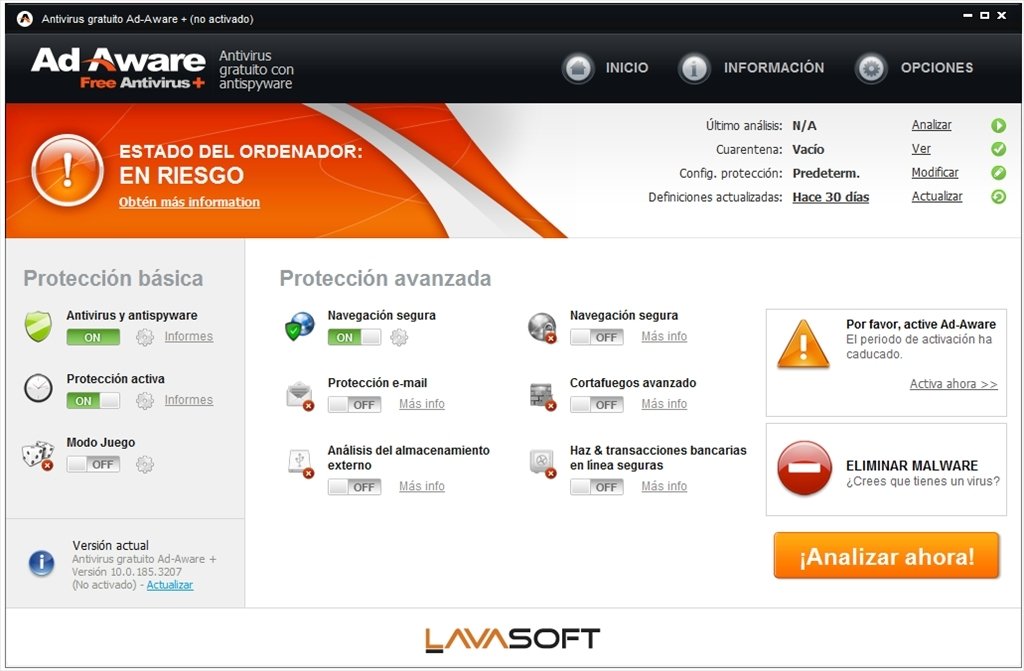
Ad-Aware 9.6.0


Ad-Aware gives you comprehensive malware protection. With real-time monitoring, threat alerts, and automatic updates you can rest easy knowing that you are protected.
  • Shop, bank, and make travel arrangements online - We keep you safe from password stealers, keyloggers, spyware, trojans, online fraudsters, identity thieves and other potential cyber criminals.
  • Control your privacy - Erase tracks left behind while surfing the Web - on browsers such as Internet Explorer, Opera, and Firefox - in one easy click.
  • Get Peace of Mind - Know that your personal information is kept safe from dangerous intruders and prying eyes.
Changelog:
  • Contains the new Security Toolbar
Download: Ad-Aware 9.6.0 | 11.4 MB (Freeware)
View: Ad-Aware Website

RPC Worm Removal Guide

So you are one of the hundreds of thousands of people that did not update your computer in time.  No problem, just follow the instructions below to remove the worm from your system.
  1. Some users that are infected with the worm have a hard time updating and removing the worm because the system automatically pops up a message informing the user that the machine is going to shut down in 60 seconds.  To stop your machine from shutting down one this message is displayed, simply go to the start menu and select run.  Then type shutdown -a in the text box and click the OK button.  This will stop the machine from shutting down.
  2. Now the first step is to apply the security patch to your system.  We will remove the worm in step three but first it is important to update your system to make it secure.   To update your system, click the link below for your operating system and download the file to your computer.
     - Windows XP Users - Click Here
     - Windows 2000 Users - Click Here
     - Windows NT Users - Click Here
     - Other Versions of this patch - Click Here

    Now that you have the patch downloaded to your computer, simply run the file from the location that you saved it at.  Follow the on screen directions and keep clicking next.
  3. Now that the security hole in your system is fixed, it is time to remove the worm.  To remove the worm, just download a special program that Symantec developed by clicking here.  Once you have downloaded the program, run it and click the start button to start the search for the worm in your system.   When it finds traces of the worm, allow the program to delete the files to rid your system of the worm.
That's it.  Now you should have a worm free system.

SuperAntiSpyware 5.0.1132


SUPERAntiSpyware Free Edition is 100% Free and will detect and remove thousands of Spyware, Adware, Malware, Trojans, KeyLoggers, Dialers, Hijackers, and Worms. SUPERAntiSpyware features many unique and powerful technologies and removes spyware threats that other applications fail to remove. Easily remove pests such as WinFixer, SpyAxe, SpyFalcon, and thousands more. Repair broken Internet Connections, Desktops, Registry Editing and more with our unique Repair System. Dedicated Threat Research Team scours the web for new threats and provides daily definition updates.

SUPERAntiSpyware Free Edition does not include real-time blocking or scheduled scanning.
Changelog:
  • Slightly faster scanning on some systems
  • Small UI fixes/updates
  • Smart Definition Updates/Enhancements
  • Better memory handling in low memory situations
 <br><br>
Download setup: SUPERAntiSpyware 5.0.1132 Free | 12.0 MB (Freeware)<br>
Download portable: SUPERAntiSpyware 5.0.1132 | 16.4 MB