TeamViewer is the fast, simple and friendly solution for remote access over the Internet - all applications in one single, very affordable module.
Remote control of computers over the Internet, Instantly take control over a computer anywhere on the Internet, even through firewalls. No installation required, just use it fast and secure. Training, sales and teamwork, TeamViewer can also be used to present your desktop to a partner on the Internet. Show and share your software, PowerPoint presentations etc. File transfer, chat and more, Share your files, chat, switch the direction during a teamwork session, and a lot more is included in TeamViewer.
Note: TeamViewer is absolutely FREE for personal, non-commercial use.
Download setup: TeamViewer 7.0.12280 | (4.8 MB) Freeware
Download portable: TeamViewer 7.0.12280 | (19.4 MB)
The Sysinternals Troubleshooting Utilities have been rolled up into a single Suite of tools. This file contains the individual troubleshooting tools and help files. It does not contain non-troubleshooting tools like the BSOD Screen Saver or NotMyFault. The Sysinternals Suite is a bundle of several Sysinternals Utilies like AccessChk, Autologon, Ctrl2Cap, DiskView, Disk Usage (DU), LogonSessions, PageDefrag, ProcessExplorer, PsLogList, PsPasswd, RegMon, RootkitRevealer, TCPView, VMMap, ZoomIt.
What's new in Sysinternals Suite 2011.12.05
- Autoruns v11.2: This update fixes a bug in the jump-to-folder function when executed on disabled items and correctly locates print monitor DLLs when they are stored in print monitor-specific system director.
- Disk Usage (DU) v1.4: This update to Du, a command line utility for analyzing the disk space consumed by directories, adds a CSV output option, accounts for the file system cluster size in its on-disk size calculations, and includes alternate data streams.
- Process Explorer v15.1: This update of Process Explorer, a Task Manager replacement, adds support for new Windows 8 features by giving the processes hosting immersive applications a distinct highlight color, shows immersive application package names in process tooltips and as a new process view column, lists AppContainer and capability SIDs in the process security properties, and updates the GPU support to be compatible with Windows 8. Other enhancements include GPU memory counters with more descriptive labels, display of the logon session ID on the security properties, and reporting of suspended processes as suspended in the CPU usage column.
- Strings v2.42: This Strings release fixes a bug that would result in a crash when the –n or -b options are specified without a file name.
Download: Sysinternals Suite | (13.1 MB) Freeware
View: Versions and Descriptions
A full-featured Internet browser, Opera includes pop-up blocking, tabbed browsing, integrated searches, and advanced functions like Opera's groundbreaking E-mail program, RSS Newsfeeds and IRC chat. And because we know that our users have different needs, you can customize the look and content of your Opera browser with a few clicks of the mouse.
- Speed Dial: Your favorite sites are just one click away at all times.
- Search Shortcuts: Faster search - type your queries directly into the address bar.
- Trash Can: Instantly reopen recently closed tabs.
- Mouse Gestures: With Opera you can navigate the Web with your mouse.
- Opera Link: Synchronize data of your choice online, or among different computers and devices.
- Quick Find: Opera remembers not only the titles and addresses, but also the actual content of the Web pages you visit.
- Feed Preview: Preview a Feed by clicking on the feed icon, and you will see it in clean and efficient multiple-column layout.
- Quick and customizable Web search: Get quick access to Google, eBay, Amazon and more with the search field in the upper right corner.
Download: Opera 11.60 for Linux
Download: Opera 11.60 for MacOS
Credit: Razvan Mihai
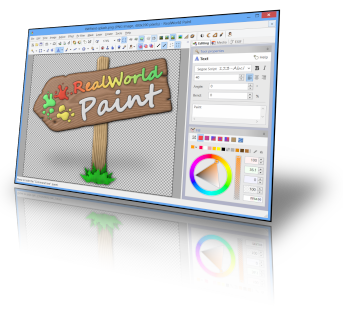
RealWorld Paint is a lightweight, easy-to-use, freeware image/photo/animation editor. It can be used to create or edit computer images or animations, convert images to animations and back. RealWorld Paint can also be used for photo retouching.
Lean, mean and clean
RealWorld Paint installs or requires NO additional packages on your computer. No .net Framework, no adware, no spyware. It just works and on a wide range of Windows versions. RWPaint can use up to 4 cores of your modern multi-core processor to speed up drawing on a large canvas.
Modify your photographs
- With RealWorld Paint, you can resize, crop or cut out objects from photographs.
- Resize pictures (with correct gamma), convert file formats, draw custom borders or frames.
- Remove blemishes with the Clone tool.
- Crop pictures and remove perspective with the Crop tool.
- Change shapes with the Shapeshifter tool (Liquify in Photoshop's terms).
- RealWorld Paint allows you to create simple animations like flashing buttons or animated forum avatars.
- Add new frames by dragging and dropping images from a file manager or via clipboard.
- Modify each frame as a normal layered image.
- Convert animations to filmstrips and vice versa.
- Built-in GIF optimizer without cryptic settings.
- Save time, maintain consistent look and feel, simplify future updates. That's what appropriate use of layer styles does for you.
- Use classic layer styles like bevel, shadow, fill, outline, or glow.
- Design your own layer style by combining any available image filter to achieve effects like automatic symmetry or kaleidoscope drawing.
- Save your favorite layer styles into your own personal style library (with previews). Download pre-made styles.
- You won't have to leave your old projects behind. RealWorld Paint can import and export native image files of other popular image editors. Images are imported or exported with layers.
- Photoshop's .psd files are imported with selected layer styles. Compatible layer styles are converted to RWPaint's native layer styles.
- RealWorld Paint also supports many standard image files like .jpg, .png, .bmp, .gif and more.
…and you will be pleasantly surprised. While the application looks simple, you will discover it goes deeper than an average freeware image editor after using it for a while. It is fast and responsive, capable of working with large images, it supports mouse gestures, can do gamma-aware blending, Photoshop plug-ins, and that’s just the beginning. And best of all: .net framework is NOT needed and the application is easily portable.
What's new in this version:
Animated PNG support
The PNG codec is now able to read and write PNG animations. Animations and pictures are always written using 32-bit color depth. To create animated pngs instead of gifs by default, add the Animated PNG Image to your favorite formats above the GIF Image on the Formats tab of the Application options window.
Paint.net 3.5.10 compatibility
The .PDN format codec is now able to import files saved with version 3.5.10 of Paint.net. Minor bugs were fixed in export to .pdn, .xcf and .psd.
Download: RealWorld Paint 2011.1 | 8.1 MB Freeware
Download portable: RealWorld Paint 2011.1 | 8.9 MB
credit: Razvan
Labels: Freeware, Image Editing, Photo Editing, Software
AIMP is a powerful audio player that allows you to listen to your favorite music with an outstanding sound quality. Its appearance resembles that of another classical audio player (Winamp), so you'll get used to it very quickly. It can also be customized with skins.
Besides playing music, AIMP features three extra utilities which also enable you to record any sound on your computer, convert audio files from one format to another and view or edit tags. AIMP is based on the well-known audio engine BASS, so it's easy to connect new plug-ins (from the plug-in library included in the program) and expand the player's functionalities.
What's new in this version:
• Added localizations: Farsi
• Localizations were updated
• Sound Engine: Resampler algorithm has been improved
• Player: Player now detects full screen applications only on the current monitor
• Player: Ability to start playback of bookmark using "Enter" key
• Plugins: Radio Browser - ability to input genre manually
• Track list: Total duration of playlist now displays in "DD:HH:MM:SS" format
• Fixed: Incompatibility with AVG and Avast antivirus
• Fixed: Incompatibility with Synaptics TouchPad
• Fixed: External playlist is not reloaded when trying to open it again
• Fixed: Player doesn't receive links to the internet radio via command line
• Fixed: Player doesn't allow drop new file to the end of playlist, if "Auto merge similar categories" option is active
• Fixed: ID3v2 tag doesn't read to the end in some cases
• Fixed: "Show information about selected files" option doesn't work
• Fixed: Player doesn't work correctly with playlists in M3U8 format
• Fixed: No an ability to capture internet-radio, if station doesn't send meta-data
• Fixed: Navigation by track doesn't work for remote files
• Fixed: Audio Library doesn't detects drive letter correctly in some cases
• Fixed: Known memory leaks
Download: AIMP 3.00 Build 961 RC 2 | 6.0 MB Freeware
View: AIMP Website
Labels: MP3 Player, Software, Video Player
SmoothTranscode is a simple to use multimedia transcoder, allowing you to convert video and audio files from one format to another. It is powered by FFmpeg, which provides high quality encoding of many popular formats, as well as video post processing.
This is an early development release, which means many features may not be available yet or may not work as intended, although we do consider the software to be stable enough for general use.
What's new in SmoothTranscode 0.4 Beta:
- [NEW] .Net Framework detection added to installer
- [NEW] Full 64 bit support
- [NEW] Support for files opened through Windows Explorer
- [NEW] Addition of various bitrate settings (Same Quality, VBR and CBR)
- [NEW] Addition of frame rate setting
- [NEW] Addition of advanced options for H.264
- [UPDATED] New application icon
- [UPDATED] Refreshed user interface
- [UPDATED] Start and stop points temporarily removed due to incomplete implementation
- [UPDATED] Save file dialog now automatically chooses the extension for the selected format
- [UPDATED] Codec lists now change to show only codecs compatible with the selected container
- [UPDATED] Changed license from GPL v2 to GPL v3
- [FIXED] Format setting now works
- [FIXED] Encodes after first encode no longer fail
Download: SmoothTranscode 0.4 Beta | 10.1 MB Freeware
Credit: John Callaham
Developed for the conceptual stages of design, Google SketchUp is a powerful yet easy-to-learn 3D modeling software tool that combines a simple, yet robust tool-set with an intelligent drawing system that streamlines and simplifies 3D design. From simple to complex, conceptual to realistic, Google SketchUp enables you to build and modify 3D models quickly and easily. Are you remodeling a kitchen, landscaping your back yard or adding a deck to your home? Google SketchUp makes it faster, easier and a lot more fun. From simple to complex, from conceptual to realistic, Google SketchUp helps you see your vision before you build it.
Get started right away.
Most people get rolling with SketchUp in just a few minutes. Dozens of video tutorials, an extensive Help Center and a worldwide user community mean that anyone who wants to make 3D models with SketchUp, can.
Model anything you can imagine.
Redecorate your living room. Design a new piece of furniture. Model your city for Google Earth. Create a skatepark for your hometown, then export an animation and share it on YouTube. There's no limit to what you can create with SketchUp.
Get models online for free.
You can build models from scratch, or you can download what you need. People all over the world share what they've made on the Google 3D Warehouse. It's a huge, searchable repository of models, and it's free.
Download: Google SketchUp 8.0.11752 | 37.0 MB (Freeware)
Razvan Mihai -
Labels: Google Sketch up, Windows
Subscribe to:
Posts (Atom)