Click to earn websites...


Ultimate Windows Customizer 1.0


There are tons of applications available to customize your Windows installation, but the problem is that most are tweak specific. Hardly any offering multiple customization options. Ultimate Windows Customizer (UWC) is the first integrated freeware that offers you almost everything that can be customized in a Windows installation – well everything that matters, at least!
It is important to note that before running Ultimate Windows Customizer, if you have tweaked your operating system either manually or by using any other software, we recommend that you reverse the changes first. This is due to the fact that upon First Run, UWC will generate backups of the Current Files and Registry Settings, to allow the user to revert back to Default. Due to the wide nature of Customizations, this is the only option to revert back to Default.

Once you are sure about this, create a System Restore Point first. Then you can go ahead and start customizing to your heart’s content!

Ultimate Windows Customizer Features:
  • Lets you customize almost all aspects of Windows including, Start Button, Logon Screen, Windows Explorer, Libraries, Context Menu, Taskbar, Windows Media Player and more
  • Very simple and easy to use. No manual Hacks. No need to manually edit the Windows Registry and Windows System files
  • Tested over and over for compatibility between various customizations.
  • 70+ major features with literally tons of sub-features
  • Built in Update Feature to be easily notified of new updates.
  • Backs up all System Files and Registry Settings that UWC deals with and does not modify these.
  • Error Log for easy display
  • Easy uninstallation via the Control Panel.
  • Creates System Restore Point before any customizations are done.
UWC also includes the following tools which will be of help to you before, during or after the customization process:
  • RegOwnIt: Lets you to take ownership of a Windows Registry key
  • Replace It : Lets you replace system files easily
  • Restart Explorer
  • Screenshot Tool
  • System File Checker
  • System Restore Creator
If you face any errors, the will be recorded in the Error Log for easy troubleshooting. You can view the error log by clicking on the View Error Log in the Extras tab.
UWC will automatically check for updates and download then automatically. But you can also Check For updates from the Settings & Extras tab.

Ultimate Windows Customizer runs on Windows 7, 32-bit and 64-bit. Support for Windows 8 and more customization options will be included in the next update.

Download: Ultimate Windows Customizer 1.0 | 10.6 MB (Freeware) mirror provided by MajorGeeks.com

Credit to: Razvan Mihai

Codec Tweak Tool 5.1.0


Codec Tweak Tool will scan for broken filters and remove them. If the tool detects something that is broken, it will then prompt you with the details and you will be given the option to remove the broken item.
With this tool you can do things like:
  • Scan the registry to detect and remove broken references to codecs and filters.
  • Generate a detailed log of all installed codecs and filters.
  • Enable/disable more than 200 popular codecs and filters (if they are installed).
  • Manage preferred source filters (a.k.a. splitters).
This tool is a Swiss army knife for managing codecs and codec settings. Below is a short overview of the functionality that this tool has to offer.

Fixes: Detect broken codecs and DirectShow filters. Fix problems with the standard DirectShow filters of Windows. A fix for a specific sound problem.
Generate log: Generate a text file with detailed information about all installed codecs and DirectShow filters, along with other relevant system information.
Reset settings: Reset settings to recommended values for many popular codecs and DirectShow filters.
Speaker configuration: Configure audio output settings for several popular audio decoders.
Various Tweaks: Several configuration options for a few DirectShow filters that don't have an easily accessible interface for those options.
DirectShow filter configuration: Easy access to the configuration interfaces of various codecs and DirectShow filters
Backup settings: Backup the settings of several codecs and DirectShow filters.
Restore settings: Replace your current settings with those from a previous backup.
Manage DirectShow filters: Enable or disable DirectShow filters.
Manage ACM/VFW codecs: Enable or disable ACM/VFW codecs.
Manage DMO: Enable or disable DirectX Media Objects.
Manage source filters: Configure your preferred DirectShow source filters (a.k.a. splitters) for several common file extensions.
Thumbnail settings: Enable or disable the generation of thumbnails for several common video file formats in Windows Explorer.

Download: Codec Tweak Tool 5.1.0 | 670 KB (Freeware)

credit to: Razvan Mihai 

Kingsoft PC Doctor 3.1.1.65


Kingsoft Security has updated his powerful computer security suite which intensively can scan, detect and remove malware, using Kingsoft Cloud Security Engine and Kingsoft V10 Antivirus Engine, patch Windows vulnerabilities, clean junk files and optimize Windows performance. While this might all sound  familiar, thanks to the abundance of cheap one-click optimizers, Kingsoft PC Doctor is an entirely different program.
Anti-Trojan: Anti-Trojan function of the Kingsoft PC Doctor exploits both the revolutionary Cloud Security Engine and powerful V10 Antivirus Engine on local device which are presented by Kingsoft Security to defense billions of malicious Trojan viruses program away from your computer.

Windows Vulnerability Repair: Repair function of the Kingsoft PC Doctor provides computer users overall and intensive Windows OS vulnerability scan service and, support the users patch such vulnerability in fast and easy-to-use operation. Meanwhile, the Windows Vulnerability Repair function presents advanced performance on Microsoft Windows 7 OS.

Windows Cleaner: Cleaner is a powerful function of the Kingsoft PC Doctor which is designed for cleaning Windows OS unused files and temporary files, erasing traces of online activities and Internet history, and cleaning Windows register. Users can execute One-Click function to run the Cleaner to free up valuable computer hard disk space.
System Repair: System Repair is an useful function of the Kingsoft PC Doctor which is designed for scan abnormal option of the Windows Operating System and, provide professional and fast repair service to computer users.

Trace Cleaning: Trace Cleaning is a powerful function which is designed for erasing traces of online activities, local computer operating behavior history and, Internet history. This function is located under the Cleaner option of the Kingsoft PC Doctor.

Plug-in Cleaning: Plug-in Cleaning function of the Kingsoft PC Doctor is a powerful suspicious plug-in application cleaner program. This function is located at the option of Anti-Trojan and, serve computer users to clean suspicious plug-in application and, defense potential security threats away.
My Startup - Detailed Startup Time: As a newly added feature, "My Startup" displays the detailed startup time of user's PC. Are you still troubling with the slow startup? This useful feature can tell you the reason of your slow startup.

Download: Kingsoft PC Doctor 3.1.1.65 | 15.3 MB (Freeware)

credit to: Razvan Mihai

Report: US government seizes over 130 web domains


A few days before the launch of Cyber Monday, the US government is reportedly cracking down on a number of web sites that have been labeled to be selling pirated software or counterfeited merchandise. Torrentfreak.com reports that over the last day or so it has found that over 130 web sites have been taken over by the government. So far there's been no official word from any government agencies about these actions, although it's possible that they are waiting until Cyber Monday to make the official announcement.
The article lists the web sites that have been taken over, and most of them appear to charge people to use their businesses. From the list, it looks like the vast majority of the web sites had online store fronts that sold counterfeit sports apparel items. One of the sites, autocd.com, did apparently sell pirated software items.
The article points out that the federal government took control of over 82 web sites under similar conditions nearly one year ago including some web sites that distributed free music and movie downloads and a web site devoted to finding torrent-based files. The government, including the Department of Justice, called the efforts "Operation In Our Sites." However it doesn't appear that software download sites were the targets of this latest operation.

Credit to: Razvan Mihai

Trillian 5.1.0.15c


Trillian is a fully featured, stand-alone, skinnable chat client that supports AIM, ICQ, MSN, Yahoo Messenger, and IRC. It provides capabilities not possible with original network clients, while supporting standard features such as audio chat, file transfers, group chats, chat rooms, buddy icons, multiple simultaneous connections to the same network, server-side contact importing, typing notification, direct connection (AIM), proxy support, encrypted messaging (AIM/ICQ), SMS support, and privacy settings.
Without stealing your home page and with no other included software, pop-ups, or spyware, Trillian provides unique functionality such as:
  • contact message history,
  • a powerful skinning language,
  • tabbed messaging,
  • global status changes (set all networks away at once),
  • Instant Lookup (automatic Wikipedia integration),
  • contact alerts,
  • an advanced automation system to trigger events based on anything happening in the client,
  • docking,
  • hundreds of emoticons,
  • emotisounds,
  • shell extensions for file transfers, and
  • systray notifications.
Download: Trillian 5.1.0.15c | (20.3 MB) Freeware

Credit: Razvan Mihai 

CDBurnerXP 4.3.9.2809


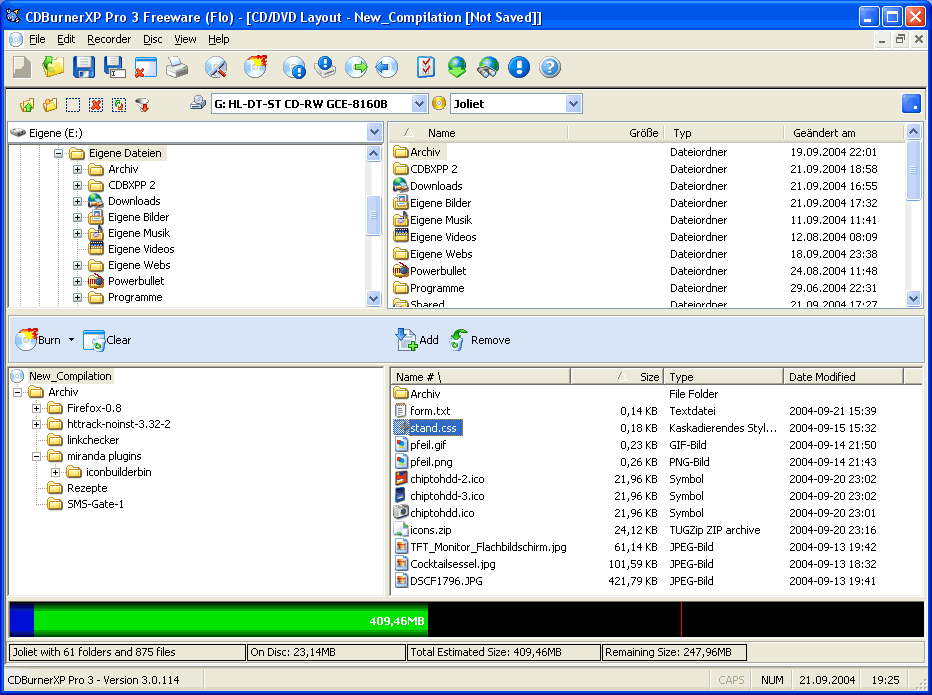
CDBurnerXP is a free application to burn CDs and DVDs, including Blu-Ray and HD-DVDs. It also includes the feature to burn and create ISOs, as well as a multilanguage interface. Everyone, even companies, can use it for free.
Key Features include:
  • burn all kinds of discs
  • audio-CDs with or without gaps between tracks
  • burn and create ISO files
  • data verification after burning process
  • create bootable discs
  • multi-language interface
  • bin/nrg to ISO converter, simple cover printing and much more!
  • Operating Systems: Windows 2000/XP/2003 Server/Vista/Windows 7
Changelog:
  • Disc spanning improved, number of copies for disc copying and better working (in regard to upgrades) MSI installer.
Note: Offers to install a 3rd party program that you can easily opt out of during install.

DownloadCDBurnerXP 4.3.9.2809 | 4.9 MB (Freeware)

credit: Razvan Mihai

WYSIWYG Web Builder 8.0


Web Builder  is a WYSIWYG (What-You-See-Is-What-You-Get) program used to create complete web sites. WYSIWYG means that the finished page will display exactly the way it was designed. The program generates HTML (HyperText Markup Language) tags while you point and click on desired functions; you can create a web page without learning HTML. Just drag and drop objects to the page position them 'anywhere' you want and when you're finished publish it to your web server (using the build in Publish tool). Web Builder gives you full control over the content and layout of your web pages. One Web Builder project file can hold multiple web pages.
WYSIWYG Web Builder features:
- No HTML knowledge needed!
- Drag and drop objects from the toolbox on the page: Text, Lines, Images, Marquees and Tables.
- Site Management. Easily add, edit, clone and structure your web pages from a single file.
- Customizable menus, toolbars, keyboard accelerators, dockable windows, tabs, autohide windows.
- Form layout object to create forms, including actions, hidden fields etc.
- Supports Form fields: Editbox, TextArea, Checkbox, Radiobutton, Combobox and Button.
- Rich text support: text object can contain different fonts, colors, links and sizes.
- Option to add custom HTML for each object (Before Tag, Inside Tag, After Tag).
- Custom HTML object to insert your own HTML or Javascripts.
- ActiveX, JAVA, Flash, Windows Media player, Quicktime, Real Audio and other Plug-In support.
- Publish your entire web site, a single page or a group of pages (to local drive or a web server) .
- Build-in Photo Gallery maker, with lots of cool features like picture frames!
- Rollover images.
- Bulleted Lists: Circle, Disc, Square, Numeric (1, 2, 3), Alpha (a, b, c) , Roman (I, II, III) and custom images.
- Image maps.
- Customize scrollbar colors for Microsoft Internet Explorer.
- Navigation bars.
- Ready-to-use Javascripts.
- Template support. Already more than 100 templates available!
- Support for Cascading Style Sheet positioning (layered layout).
- Insert Symbols (special characters).
- Verify links tool.
- Rotating Image component (useful for Ad Banners).
- Support for third-party add-ons, using the Web Builder Component Developers Kit.
- Import existing HTML pages.
- Hyperlink Style Sheet, to customize the colors/formatting of hyperlinks.
- Show optional rulers.
- Page transitions in Page Properties.
- Inline Frame component (IFRAME).
- Go menu: easily create a drop-down navigation menus.
- Menubar: powerful menu script that can mimic complex menus found in popular GUI applications.
- Shape object (Rectangle, Round rect, Ellipse, Diamond, Hexagon, Octagon, Parallelogram, Triangle, Trapezoid, Arrows, Flag, Flower, Heart, Signs, Stars, Talk Bubbles and much more!
- Embedded OLE component.
- Embedded page object. This allows you to re-use objects from other pages (master page concept).
What's new in this version:
  • WYSIWYG Web Builder 8.0 has more than 150 new features/improvements, full list of changes here.
Download: WYSIWYG Web Builder 8.0 |  6.9 MB (Shareware)

credit: Razvan Mihai