Click to earn websites...


SUPERAntiSpyware 5.0.1144

SUPERAntiSpyware Free Edition is 100% Free and will detect and remove thousands of Spyware, Adware, Malware, Trojans, KeyLoggers, Dialers, Hijackers, and Worms. SUPERAntiSpyware features many unique and powerful technologies and removes spyware threats that other applications fail to remove. Easily remove pests such as WinFixer, SpyAxe, SpyFalcon, and thousands more. Repair broken Internet Connections, Desktops, Registry Editing and more with our unique Repair System. Dedicated Threat Research Team scours the web for new threats and provides daily definition updates.
SUPERAntiSpyware Free Edition does not include real-time blocking or scheduled scanning.


Download setup: SUPERAntiSpyware 5.0.1142 Free | Mirror | 13.0 MB (Freeware)
Download portable: SUPERAntiSpyware 5.0.1144 | 17.8 MB


Razvan Mihai 


WinSnap 4.0.2

WinSnap is a small but powerful utility for taking and editing screenshots. It can easily capture windows of non-rectangular form with the background of your choice, automatically perform simple canvas transformations and coloring effects, add professional smoothing shadows in Photoshop style and more. Also, WinSnap supports variety of image formats and provides advanced auto-save features.


Changelog:
  • Fixed showing/restoring the main window after capture
  • Fixed sharpness of printed images and print resolution
  • Fixed restoring of auto-save and auto-copy options at startup
  • Fixed issue with watermark position on the bottom-left
  • Fixed issue with 1px outline when shadow is disabled
  • Fixed closing of tray menu on losing focus and ESC
  • Fixed background color of copied to clipboard images
  • Fixed non-default format selection in Save dialog
  • Many minor improvements and bug fixes
Download: WinSnap 4.0.2 (32-bit, 64-bit, portable, U3) - (Shareware, $24.95)
View: NTWind Blog

credit: Razvan Mihai

Windows Keywords Windows NT/2000/XP Windows How to shutdown your computer from a distance...


There's a small utility called "SHUTCMD.EXE" included in the Windows NT Resource Kit that you can use to shutdown or restart a local or remote computer.
For example, you can shutdown the local computer by running:

    SHUTCMD /L
 
to shutdown a computer on your network ("SERVER1" being the name of the computer you want to shutdown):
    SHUTCMD \\SERVER1 /Y
 
to shutdown a remote computer connected to the Internet ("205.56.44.24" being the IP address of the computer you want to shutdown):

    SHUTCMD \\205.56.44.24 /Y

Nero Burning ROM 11.0.10500


Preserve your photos, videos, music with the most established burning technology in the industry. The award-winning Nero Burning ROM 11 reliably burns content to CD, DVD and Blu-ray Disc. Easy to use and even easier to share, the robust burning solution comes with powerful security and customizable features that go beyond just burning.
Key features:
  • Burn long lasting discs - Exclusive Nero SecurDisc 3.0 burning helps ensure disc readability regardless of scratches, age and deterioration.
  • Span multiple discs - With Nero DiscSpan, you can split oversized files and burn them to the number of required discs at one time.
  • Rip audio - Easily create playlists or CD mixes of your favorite tunes right on your computer for instant playback.
  • Disc Surface Scan - Go beyond just burning with more SecurDisc features such as surface scan, which offers additional reliability of burned optical discs.
  • Disc copy - Copy music to CDs and even HD movies to Blu-ray Disc quickly and easily.
Please note:

The Nero Burning ROM 11 trial version can be tested for 15 days starting from the date of installation.
AVCHD authoring and playback as well as MPEG-4 and BD-AV formats are not supported in the Nero Burning ROM 11 trial version.

Download: Nero Burning ROM 11.0.10500 | 120 MB (Shareware)
View: Homepage | Changelog

Comodo Cleaning Essentials 2.3.219500.176

Comodo Cleaning Essentials (CCE) is a set of powerful security tools designed to help users identify and remove malware and unsafe processes from Windows computers. Designed as a portable application, the software requires no installation and can be run directly from removable media such as a USB key.
CCE consists of two core technologies:

  • KillSwitch - an advanced system monitoring tool that allows users to identify, monitor and stop potentially unsafe processes that are running on endpoint systems. Uniquely for a product of its type, KillSwitch leverages Comodo's huge whitelist database to isolate untrusted processes with an extremely high degree of accuracy – improving IT operational efficiency by reducing false positives and cutting the amount of time spent troubleshooting an endpoint machine.
  • Malware scanner – fully featured malware scanner capable of unearthing and removing viruses, rootkits, hidden files and malicious registry keys hidden deep within a system. The scanner is highly configurable, uses the latest heuristic techniques to detect previously unknown viruses, features first-class malware removal capabilities and is capable of detecting hidden drivers and services loaded during system start-up.
Features:
  • Classifies the threat level of all objects and processes currently loaded into memory and highlights those that are not trusted
  • Allows the admin to terminate, delete or suspend every untrusted item with a single click.
  • On-demand malware scanner quickly finds viruses, rootkits and hidden services
  • Extremely efficient malware removal routines thoroughly disinfect virus stricken endpoints
  • Detailed statistics and graphs allow admins to analyze and fine tune system activity to almost infinite levels of detail
  • Leverages Comodo's huge whitelist database to accurately identify the trust status of every running process with minimal false positives
  • Integration with Comodo cloud scanning technology delivers instant behavioral analysis of unknown processes
  • Powerful system tools provide control over even the most obscure system settings
  • Simple interface for admins to manage trusted vendors list
  • Comprehensive event logs provide detailed overview of system activity on endpoint machines
  • Quick repair feature allows fast restoration of important Windows settings
  • Can replace the standard Windows Task Manager if required
  • Another indispensable addition to admin's security toolkit to complement software such as Comodo Internet Security
  • Lightweight – requires no installation and can be run right from a USB stick
  • Fast, free and easy to use
Download: Comodo Cleaning Essentials 32-bit | (22.7 MB) Freeware
Download: Comodo Cleaning Essentials 64-bit | (24.4 MB) Freeware
 

Avira AntiVir Personal 12.0.0.872


Avira AntiVir Personal - FREE Antivirus is a reliable free antivirus solution, that constantly and rapidly scans your computer for malicious programs such as viruses, Trojans, backdoor programs, hoaxes, worms, dialers etc. Monitors every action executed by the user or the operating system and reacts promptly when a malicious program is detected.
Avira AntiVir 12.0 Highlights:

More intuitive User Interfaces – A cleaner, more modern screen design with options organized by function, and a streamlined 2-click install process and automatic resolution of software conflicts during installation. Avira’s software was designed with default configurations to make installation easier, to keep the user safer, and to take the guesswork out of remaining secure. Also, users will discover that many components have been renamed so that every consumer can understand their function without reading the documentation. And best of all, a one-click “Fix Problems” button to solve any issues that might endanger users’ computers.

Smarter Code – Avira software has even further increased detection rates by out-witting malware that hides from ordinary antivirus software. New detection mechanisms find rogue code that hides even deep in the operating system.

Stronger Detection – All components have been fortified in order to better resist malware attacks that target antivirus software specifically. This fortification includes the ability for Avira software to function without many registry keys, better resistance against process termination and component deletion, and many other malware counter-measures.

In addition to a simpler interface, smarter code, and stronger detection, Avira 2012 also focuses on support by adding Live Customer Support for all premium products. If users run into any problems, they can connect directly with a technical support engineer who will fix the problems in real time over the Internet using Avira’s new Team Viewer feature.

Lastly, running two security solutions in parallel can have negative consequences on the stability of the PC and the overall experience with newly installed software. So in order to make the transition to the Avira products version 2012 as easy and painless as possible, automatic detection and removal of potentially incompatible software has been added in all installation programs. No worries, it is possible to select what 3rd party solutions to keep.
  • Detects and removes more than 150,000 viruses
  • Always among the winners of comparison test featured in computer journals
  • The resident Virus Guard serves to monitor file movements automatically, e.g. downloading of data from the internet
  • Scanning and repair of macro viruses
  • Protection against previously unknown macro viruses
  • Protection against trojans, worms, backdoors, jokes and other harmful programs
  • AntiVir protection against viruses, worms and Trojans
  • AntiDialer protection against expensive dialers
  • AntiRootkit protection against hidden rootkits
  • AntiPhishing protection against phishing
  • AntiSpyware protection against spyware and adware
  • NetbookSupport for laptops with low resolution
  • QuickRemoval eliminates viruses at the push of a button
  • Easy operation
  • Internet-Update Wizard for easy updating
  • Protection against previously unknown boot record viruses and master boot record viruses
Download: Avira AntiVir Personal 12.0.0.872 | 83.0 MB (Freeware, non commercial use)
View: AntiVir Website for Product Information

credit: Razvan

SUPERAntiSpyware 5.0.1142


SUPERAntiSpyware Free Edition is 100% Free and will detect and remove thousands of Spyware, Adware, Malware, Trojans, KeyLoggers, Dialers, Hijackers, and Worms. SUPERAntiSpyware features many unique and powerful technologies and removes spyware threats that other applications fail to remove. Easily remove pests such as WinFixer, SpyAxe, SpyFalcon, and thousands more. Repair broken Internet Connections, Desktops, Registry Editing and more with our unique Repair System. Dedicated Threat Research Team scours the web for new threats and provides daily definition updates.

UPERAntiSpyware Free Edition does not include real-time blocking or scheduled scanning. Download 

setup: SUPERAntiSpyware 5.0.1142 Free | 13.0 MB (Freeware)
Download portable: SUPERAntiSpyware 5.0.1142 | 17.8 MB

credit: Razvan Azmanov

TeamViewer 7.0.12280


TeamViewer is the fast, simple and friendly solution for remote access over the Internet - all applications in one single, very affordable module.

Remote control of computers over the Internet, Instantly take control over a computer anywhere on the Internet, even through firewalls. No installation required, just use it fast and secure. Training, sales and teamwork, TeamViewer can also be used to present your desktop to a partner on the Internet. Show and share your software, PowerPoint presentations etc. File transfer, chat and more, Share your files, chat, switch the direction during a teamwork session, and a lot more is included in TeamViewer.


Note: TeamViewer is absolutely FREE for personal, non-commercial use.
Download setup: TeamViewer 7.0.12280 | (4.8 MB) Freeware
Download portable: TeamViewer 7.0.12280 | (19.4 MB)

Sysinternals Suite 2011.12.05


The Sysinternals Troubleshooting Utilities have been rolled up into a single Suite of tools. This file contains the individual troubleshooting tools and help files. It does not contain non-troubleshooting tools like the BSOD Screen Saver or NotMyFault. The Sysinternals Suite is a bundle of several Sysinternals Utilies like AccessChk, Autologon, Ctrl2Cap, DiskView, Disk Usage (DU), LogonSessions, PageDefrag, ProcessExplorer, PsLogList, PsPasswd, RegMon, RootkitRevealer, TCPView, VMMap, ZoomIt.
What's new in Sysinternals Suite 2011.12.05
  • Autoruns v11.2: This update fixes a bug in the jump-to-folder function when executed on disabled items and correctly locates print monitor DLLs when they are stored in print monitor-specific system director.
  • Disk Usage (DU) v1.4: This update to Du, a command line utility for analyzing the disk space consumed by directories, adds a CSV output option, accounts for the file system cluster size in its on-disk size calculations, and includes alternate data streams.
  • Process Explorer v15.1: This update of Process Explorer, a Task Manager replacement, adds support for new Windows 8 features by giving the processes hosting immersive applications a distinct highlight color, shows immersive application package names in process tooltips and as a new process view column, lists AppContainer and capability SIDs in the process security properties, and updates the GPU support to be compatible with Windows 8. Other enhancements include GPU memory counters with more descriptive labels, display of the logon session ID on the security properties, and reporting of suspended processes as suspended in the CPU usage column.
  • Strings v2.42: This Strings release fixes a bug that would result in a crash when the –n or -b options are specified without a file name.
Tip: Don’t forget to download the Windows System Control Center (WSCC) a free, portable program that allows you to view, execute and organize the utilities from various system utility suites (Sysinternals included).

Download: Sysinternals Suite | (13.1 MB) Freeware
View: Versions and Descriptions

Opera 11.60 Final


A full-featured Internet browser, Opera includes pop-up blocking, tabbed browsing, integrated searches, and advanced functions like Opera's groundbreaking E-mail program, RSS Newsfeeds and IRC chat. And because we know that our users have different needs, you can customize the look and content of your Opera browser with a few clicks of the mouse.
  • Speed Dial: Your favorite sites are just one click away at all times.
  • Search Shortcuts: Faster search - type your queries directly into the address bar.
  • Trash Can: Instantly reopen recently closed tabs.
  • Mouse Gestures: With Opera you can navigate the Web with your mouse.
  • Opera Link: Synchronize data of your choice online, or among different computers and devices.
  • Quick Find: Opera remembers not only the titles and addresses, but also the actual content of the Web pages you visit.
  • Feed Preview: Preview a Feed by clicking on the feed icon, and you will see it in clean and efficient multiple-column layout.
  • Quick and customizable Web search: Get quick access to Google, eBay, Amazon and more with the search field in the upper right corner.
Download: Opera 11.60 for Windows | 10.1 MB (Freeware)
Download: Opera 11.60 for Linux
Download: Opera 11.60 for MacOS


Credit: Razvan Mihai

RealWorld Paint 2011.1


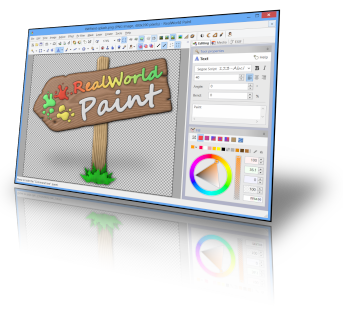
RealWorld Paint is a lightweight, easy-to-use, freeware image/photo/animation editor. It can be used to create or edit computer images or animations, convert images to animations and back. RealWorld Paint can also be used for photo retouching.

Lean, mean and clean
RealWorld Paint installs or requires NO additional packages on your computer. No .net Framework, no adware, no spyware. It just works and on a wide range of Windows versions. RWPaint can use up to 4 cores of your modern multi-core processor to speed up drawing on a large canvas.

Modify your photographs
  • With RealWorld Paint, you can resize, crop or cut out objects from photographs.
  • Resize pictures (with correct gamma), convert file formats, draw custom borders or frames.
  • Remove blemishes with the Clone tool.
  • Crop pictures and remove perspective with the Crop tool.
  • Change shapes with the Shapeshifter tool (Liquify in Photoshop's terms).
Make animations
  • RealWorld Paint allows you to create simple animations like flashing buttons or animated forum avatars.
  • Add new frames by dragging and dropping images from a file manager or via clipboard.
  • Modify each frame as a normal layered image.
  • Convert animations to filmstrips and vice versa.
  • Built-in GIF optimizer without cryptic settings.
Use layers and styles
  • Save time, maintain consistent look and feel, simplify future updates. That's what appropriate use of layer styles does for you.
  • Use classic layer styles like bevel, shadow, fill, outline, or glow.
  • Design your own layer style by combining any available image filter to achieve effects like automatic symmetry or kaleidoscope drawing.
  • Save your favorite layer styles into your own personal style library (with previews). Download pre-made styles.
Photoshop, GIMP, Paint.net compatibility
  • You won't have to leave your old projects behind. RealWorld Paint can import and export native image files of other popular image editors. Images are imported or exported with layers.
  • Photoshop's .psd files are imported with selected layer styles. Compatible layer styles are converted to RWPaint's native layer styles.
  • RealWorld Paint also supports many standard image files like .jpg, .png, .bmp, .gif and more.
Give it a try!
…and you will be pleasantly surprised. While the application looks simple, you will discover it goes deeper than an average freeware image editor after using it for a while. It is fast and responsive, capable of working with large images, it supports mouse gestures, can do gamma-aware blending, Photoshop plug-ins, and that’s just the beginning. And best of all: .net framework is NOT needed and the application is easily portable.


What's new in this version:
Animated PNG support
The PNG codec is now able to read and write PNG animations. Animations and pictures are always written using 32-bit color depth. To create animated pngs instead of gifs by default, add the Animated PNG Image to your favorite formats above the GIF Image on the Formats tab of the Application options window.
Paint.net 3.5.10 compatibility
The .PDN format codec is now able to import files saved with version 3.5.10 of Paint.net. Minor bugs were fixed in export to .pdn, .xcf and .psd.

Download: RealWorld Paint 2011.1 | 8.1 MB Freeware

Download portable: RealWorld Paint 2011.1 | 8.9 MB

credit: Razvan

AIMP 3.00 Build 961 RC 2


AIMP is a powerful audio player that allows you to listen to your favorite music with an outstanding sound quality. Its appearance resembles that of another classical audio player (Winamp), so you'll get used to it very quickly. It can also be customized with skins.
The program includes a 18-band equalizer, a visualization window to display rhythmic visual effects and a playlist editor to organize your audio files. A nice fading effect makes your list of songs look like an endless music loop and a handy volume normalizing feature avoids drastic volume changes between tracks. Also, the player's main functions can be conveniently controlled by global hotkeys.
Besides playing music, AIMP features three extra utilities which also enable you to record any sound on your computer, convert audio files from one format to another and view or edit tags. AIMP is based on the well-known audio engine BASS, so it's easy to connect new plug-ins (from the plug-in library included in the program) and expand the player's functionalities.

What's new in this version:
• Added localizations: Farsi
• Localizations were updated
• Sound Engine: Resampler algorithm has been improved
• Player: Player now detects full screen applications only on the current monitor
• Player: Ability to start playback of bookmark using "Enter" key
• Plugins: Radio Browser - ability to input genre manually
• Track list: Total duration of playlist now displays in "DD:HH:MM:SS" format
• Fixed: Incompatibility with AVG and Avast antivirus
• Fixed: Incompatibility with Synaptics TouchPad
• Fixed: External playlist is not reloaded when trying to open it again
• Fixed: Player doesn't receive links to the internet radio via command line
• Fixed: Player doesn't allow drop new file to the end of playlist, if "Auto merge similar categories" option is active
• Fixed: ID3v2 tag doesn't read to the end in some cases
• Fixed: "Show information about selected files" option doesn't work
• Fixed: Player doesn't work correctly with playlists in M3U8 format
• Fixed: No an ability to capture internet-radio, if station doesn't send meta-data
• Fixed: Navigation by track doesn't work for remote files
• Fixed: Audio Library doesn't detects drive letter correctly in some cases
• Fixed: Known memory leaks


Download: AIMP 3.00 Build 961 RC 2 | 6.0 MB Freeware
View: AIMP Website

 Credit: Razvan Mihai

SmoothTranscode 0.4 Beta


SmoothTranscode is a simple to use multimedia transcoder, allowing you to convert video and audio files from one format to another. It is powered by FFmpeg, which provides high quality encoding of many popular formats, as well as video post processing.

This is an early development release, which means many features may not be available yet or may not work as intended, although we do consider the software to be stable enough for general use.

What's new in SmoothTranscode 0.4 Beta:
  • [NEW] .Net Framework detection added to installer
  • [NEW] Full 64 bit support
  • [NEW] Support for files opened through Windows Explorer
  • [NEW] Addition of various bitrate settings (Same Quality, VBR and CBR)
  • [NEW] Addition of frame rate setting
  • [NEW] Addition of advanced options for H.264
  • [UPDATED] New application icon
  • [UPDATED] Refreshed user interface
  • [UPDATED] Start and stop points temporarily removed due to incomplete implementation
  • [UPDATED] Save file dialog now automatically chooses the extension for the selected format
  • [UPDATED] Codec lists now change to show only codecs compatible with the selected container
  • [UPDATED] Changed license from GPL v2 to GPL v3
  • [FIXED] Format setting now works
  • [FIXED] Encodes after first encode no longer fail

Download: SmoothTranscode 0.4 Beta | 10.1 MB Freeware

Credit: John Callaham

Google SketchUp 8.0.11752


Developed for the conceptual stages of design, Google SketchUp is a powerful yet easy-to-learn 3D modeling software tool that combines a simple, yet robust tool-set with an intelligent drawing system that streamlines and simplifies 3D design. From simple to complex, conceptual to realistic, Google SketchUp enables you to build and modify 3D models quickly and easily. Are you remodeling a kitchen, landscaping your back yard or adding a deck to your home? Google SketchUp makes it faster, easier and a lot more fun. From simple to complex, from conceptual to realistic, Google SketchUp helps you see your vision before you build it.

Get started right away.
Most people get rolling with SketchUp in just a few minutes. Dozens of video tutorials, an extensive Help Center and a worldwide user community mean that anyone who wants to make 3D models with SketchUp, can.

Model anything you can imagine.
Redecorate your living room. Design a new piece of furniture. Model your city for Google Earth. Create a skatepark for your hometown, then export an animation and share it on YouTube. There's no limit to what you can create with SketchUp.

Get models online for free.
You can build models from scratch, or you can download what you need. People all over the world share what they've made on the Google 3D Warehouse. It's a huge, searchable repository of models, and it's free.

Download: Google SketchUp 8.0.11752 | 37.0 MB (Freeware)

Razvan Mihai -

Kaizer Killer The Remover

***Note: Viruses that this removal can treat are not all specified..
If on the first time to run this application and doesn't remove any viruses/malicious script, run it once again.


***Please support Kaizer Killer, just free to contactd us, and inform
us bout the latest virus that you've encountered and you wish to be added in the virus list of Kaizer Killer. Thank You!.


Here are some viruses it can remove:

1. $lddata$ removal
2. __.* remover
3. _defau~1.pif removal
4. _exp1orer.exe remover
5. _istmpi.dir removal
6. _noteped.exe remover
7. _sv_cmd_ removal
8. 111.exe remover
9. 3g08.bat removal
10. 3wcxx91.cmd remover
11. 8ng8w.com removal
12. 8ot8y86.exe remover
13. 8u.com removal
14. ac12594 remover
15. Ad22098 removal
16. adober.exe remover
17. aikelyu.html removal
18. alecks.* remover
19. amvo.exe removal
20. amvo0.dll remover
21. amvo1.dll removal
22. an16554 remover
23. autorun.* removal
24. avpo*.* remover
25. awkeygen.exe removal
26. azkaban.* remover
27. bacabr~1.txt removal
28. bar311.exe remover
29. blastcln.exe removal
30. blastclnnn.exe remover
31. boot.exe removal
32. ccprxy.exe remover
33. copy.exe removal
34. crss.exe remover
35. ctfmon.exe removal
36. d.com remover
37. mdm.exe removal
38. desktop.exe remover
39. desktop.ini removal
40. destrukto.* remover
41. destrukto.vbs removal
42. dismgnt.exe remover
43. dllhost.com removal
44. dnscon70.dll remover
45. dv6191~1 removal
46. dv6211~1 remover
47. dv6333~1 removal
48. exiplorer.exe remover
49. exp1orer.exe removal
50. explorar.vbs remover
51. explorer.exe removal
52. explorer.vbs remover
53. folder.htt removal
54. FS6519.dll.vbs remover
55. Funny UST Scandal.avi.exe removal
56. funnyu~1.exe remover
57. g2p3s.exe removal
58. gwe(i~1.exe remover
59. h.cmd removal
60. h2.com remover
61. homepage.html removal
62. host.exe remover
63. ie.exe removal
64. iexp1ore.exe remover
65. iloveher.exe removal
66. imgkulot.* remover
67. infrom.dat removal
68. infrom.exe remover
69. intern~1.lnk removal
70. isass.exe remover
71. j6154022.exe removal
72. j6154022.exe remover
73. jalak-~1.com removal
74. jay.exe remover
75. jaymeyka.wen9.com removal
76. kavo.exe remover
77. kavo0.dll removal
78. kavo1.dll remover
79. kernel~1.vbs removal
80. kernell.dll.vbs remover
81. killer.exe removal
82. knight.exe remover
83. krag.exe removal
84. kragdor.log remover
85. kulitut.* removal
86. ld.exe remover
87. ldjs.txt removal
88. ldlist.txt remover
89. ldup.exe removal
90. ldupver.txt remover
91. lsass.exe removal
92. lsasse~1.exe remover
93. maskrider2001.vbs removal
94. mdm.exe remover
95. mgrShell.exe removal
96. mma.bat remover
97. mma.reg removal
98. mma.vbs remover
99. ms.config removal
100. ms.config`.exe remover
101. ms32dll.dll.vbs removal
102. MS32DLL.dll.vbs remover
103. ms-dos removal
104. msinfo remover
105. msrm removal
106. mstcpcon20.dll remover
107. msvcr71.dll removal
108. mswinsck.ocx remover
109. mveo.exe removal
110. myfold~1.com remover
111. n1deiect.com removal
112. n2847 remover
113. n5619 removal
114. n8127 remover
115. netmanage.dll removal
116. netsvcs.exe remover
117. netused.dll removal
118. new document.exe remover
119. new folder.exe removal
120. newdoc~1.exe remover
121. newfol~1.exe removal
122. noteped.exe remover
123. nt.config removal
124. ntde1ect.com remover
125. ntkros.dll removal
126. ntsys.exe remover
127. o4154027.exe removal
128. ofcpfwsvcs.exe remover
129. p3r1ud.exe removal
130. passwo~1.exe remover
131. Password:winzip123 removal
132. password_viewer.exe remover
133. pc-off.bat removal
134. pet32.exe remover
135. photos.zip.exe removal
136. photos~1.exe remover
137. poogs.vbs removal
138. pooh.vbs remover
139. ratedr~1.com removal
140. ravmone.exe remover
141. ravmonlog removal
142. recycled remover
143. recycler removal
144. recycler.exe remover
145. redelbat.bat removal
146. rm remover
147. rootfo~1.com removal
148. S2pidwaraynon.html remover
149. s5421 removal
150. s6939 remover
151. s8787 removal
152. Say No To Drugs - iloveher.exe remover
153. scvhost.exe removal
154. scvhosts.exe remover
155. scvhsot.exe removal
156. scvshosts.exe remover
157. scvvhsot.exe removal
158. SecretStub.exe remover
159. sender.vbs removal
160. setting.ini remover
161. setup removal
162. setup.exe remover
163. sexvid~1.exe removal
164. silent~1.exe remover
165. SilentSoftecth.exe removal
166. smss.exe remover
167. spoclsv.exe removal
168. sqlserv.exe remover
169. sscvihost.exe removal
170. sscviihost.exe remover
171. ssvichosst.exe removal
172. startu~1.com remover
173. svchosl.exe removal
174. svchost.ini remover
175. svchost32.exe removal
176. svhost.exe remover
177. svhost32.exe removal
178. svohost.exe remover
179. svshost.exe removal
180. sxs.exe remover
181. sy.exe removal
182. SY20118 remover
183. t.exe removal
184. test.* remover
185. ttms*.dll.vbs removal
186. ugqe
187. VBS_SOLOW.A (Taga Lipa Are, Taga Xpress-On Kami, Taga Eti, Marinduque Mabuhay, Malaysian, Hackers, Protected by CPCT, Hacked by-Godzilla, M00zilla, YaHaa,"Your Firewall is Fuck", Zay, UC).
188. vhost.exe removal
189. wincab.sys remover
190. winconfig.dll.vbs removal
191. winkrnl.exe remover
192. winlogon.exe removal
193. winscok.dll remover
194. wintask.exe removal
195. wmiprvse.exe remover
196. WORM_ONLINEG.TCZ (q83iwmgf.bat) removal
197. wscript.exe remover
198. wsctf.exe removal
199. wvcst.* remover
200. x.com removal
201. x264~1.exe remover
202. xn1i9x.com removal
203. ymworm.exe remover
204. zelurm~1.exe removal
205. zllictbl.dat remover

thank your for the maker of tool...GIGZ.

<a href="http://64032780.linkbucks.com"> Download Here </a>

Adobe AIR 3.2 Beta 2


The Adobe® AIR, runtime enables you to have your favorite web applications with you all the time. Since applications built for Adobe AIR run on your desktop computer without a web browser, they provide all the convenience of a desktop application.

Companies like eBay and AOL are using Adobe AIR to create exciting new applications that allow you to use their services on your desktop.

In short, Adobe AIR means applications that are easier, more powerful, and more fun to use.
Be safe on the web: Adobe AIR helps ensure safe installations by requiring digital signatures on each AIR application that identify the application and its creator before you install.

Download: Adobe AIR 3.2 Beta 2 | 14.5 MB (Freeware)

credit to: Razvan Mihai

Ultimate Windows Customizer 1.0


There are tons of applications available to customize your Windows installation, but the problem is that most are tweak specific. Hardly any offering multiple customization options. Ultimate Windows Customizer (UWC) is the first integrated freeware that offers you almost everything that can be customized in a Windows installation – well everything that matters, at least!
It is important to note that before running Ultimate Windows Customizer, if you have tweaked your operating system either manually or by using any other software, we recommend that you reverse the changes first. This is due to the fact that upon First Run, UWC will generate backups of the Current Files and Registry Settings, to allow the user to revert back to Default. Due to the wide nature of Customizations, this is the only option to revert back to Default.

Once you are sure about this, create a System Restore Point first. Then you can go ahead and start customizing to your heart’s content!

Ultimate Windows Customizer Features:
  • Lets you customize almost all aspects of Windows including, Start Button, Logon Screen, Windows Explorer, Libraries, Context Menu, Taskbar, Windows Media Player and more
  • Very simple and easy to use. No manual Hacks. No need to manually edit the Windows Registry and Windows System files
  • Tested over and over for compatibility between various customizations.
  • 70+ major features with literally tons of sub-features
  • Built in Update Feature to be easily notified of new updates.
  • Backs up all System Files and Registry Settings that UWC deals with and does not modify these.
  • Error Log for easy display
  • Easy uninstallation via the Control Panel.
  • Creates System Restore Point before any customizations are done.
UWC also includes the following tools which will be of help to you before, during or after the customization process:
  • RegOwnIt: Lets you to take ownership of a Windows Registry key
  • Replace It : Lets you replace system files easily
  • Restart Explorer
  • Screenshot Tool
  • System File Checker
  • System Restore Creator
If you face any errors, the will be recorded in the Error Log for easy troubleshooting. You can view the error log by clicking on the View Error Log in the Extras tab.
UWC will automatically check for updates and download then automatically. But you can also Check For updates from the Settings & Extras tab.

Ultimate Windows Customizer runs on Windows 7, 32-bit and 64-bit. Support for Windows 8 and more customization options will be included in the next update.

Download: Ultimate Windows Customizer 1.0 | 10.6 MB (Freeware) mirror provided by MajorGeeks.com

Credit to: Razvan Mihai

Codec Tweak Tool 5.1.0


Codec Tweak Tool will scan for broken filters and remove them. If the tool detects something that is broken, it will then prompt you with the details and you will be given the option to remove the broken item.
With this tool you can do things like:
  • Scan the registry to detect and remove broken references to codecs and filters.
  • Generate a detailed log of all installed codecs and filters.
  • Enable/disable more than 200 popular codecs and filters (if they are installed).
  • Manage preferred source filters (a.k.a. splitters).
This tool is a Swiss army knife for managing codecs and codec settings. Below is a short overview of the functionality that this tool has to offer.

Fixes: Detect broken codecs and DirectShow filters. Fix problems with the standard DirectShow filters of Windows. A fix for a specific sound problem.
Generate log: Generate a text file with detailed information about all installed codecs and DirectShow filters, along with other relevant system information.
Reset settings: Reset settings to recommended values for many popular codecs and DirectShow filters.
Speaker configuration: Configure audio output settings for several popular audio decoders.
Various Tweaks: Several configuration options for a few DirectShow filters that don't have an easily accessible interface for those options.
DirectShow filter configuration: Easy access to the configuration interfaces of various codecs and DirectShow filters
Backup settings: Backup the settings of several codecs and DirectShow filters.
Restore settings: Replace your current settings with those from a previous backup.
Manage DirectShow filters: Enable or disable DirectShow filters.
Manage ACM/VFW codecs: Enable or disable ACM/VFW codecs.
Manage DMO: Enable or disable DirectX Media Objects.
Manage source filters: Configure your preferred DirectShow source filters (a.k.a. splitters) for several common file extensions.
Thumbnail settings: Enable or disable the generation of thumbnails for several common video file formats in Windows Explorer.

Download: Codec Tweak Tool 5.1.0 | 670 KB (Freeware)

credit to: Razvan Mihai 

Kingsoft PC Doctor 3.1.1.65


Kingsoft Security has updated his powerful computer security suite which intensively can scan, detect and remove malware, using Kingsoft Cloud Security Engine and Kingsoft V10 Antivirus Engine, patch Windows vulnerabilities, clean junk files and optimize Windows performance. While this might all sound  familiar, thanks to the abundance of cheap one-click optimizers, Kingsoft PC Doctor is an entirely different program.
Anti-Trojan: Anti-Trojan function of the Kingsoft PC Doctor exploits both the revolutionary Cloud Security Engine and powerful V10 Antivirus Engine on local device which are presented by Kingsoft Security to defense billions of malicious Trojan viruses program away from your computer.

Windows Vulnerability Repair: Repair function of the Kingsoft PC Doctor provides computer users overall and intensive Windows OS vulnerability scan service and, support the users patch such vulnerability in fast and easy-to-use operation. Meanwhile, the Windows Vulnerability Repair function presents advanced performance on Microsoft Windows 7 OS.

Windows Cleaner: Cleaner is a powerful function of the Kingsoft PC Doctor which is designed for cleaning Windows OS unused files and temporary files, erasing traces of online activities and Internet history, and cleaning Windows register. Users can execute One-Click function to run the Cleaner to free up valuable computer hard disk space.
System Repair: System Repair is an useful function of the Kingsoft PC Doctor which is designed for scan abnormal option of the Windows Operating System and, provide professional and fast repair service to computer users.

Trace Cleaning: Trace Cleaning is a powerful function which is designed for erasing traces of online activities, local computer operating behavior history and, Internet history. This function is located under the Cleaner option of the Kingsoft PC Doctor.

Plug-in Cleaning: Plug-in Cleaning function of the Kingsoft PC Doctor is a powerful suspicious plug-in application cleaner program. This function is located at the option of Anti-Trojan and, serve computer users to clean suspicious plug-in application and, defense potential security threats away.
My Startup - Detailed Startup Time: As a newly added feature, "My Startup" displays the detailed startup time of user's PC. Are you still troubling with the slow startup? This useful feature can tell you the reason of your slow startup.

Download: Kingsoft PC Doctor 3.1.1.65 | 15.3 MB (Freeware)

credit to: Razvan Mihai

Report: US government seizes over 130 web domains


A few days before the launch of Cyber Monday, the US government is reportedly cracking down on a number of web sites that have been labeled to be selling pirated software or counterfeited merchandise. Torrentfreak.com reports that over the last day or so it has found that over 130 web sites have been taken over by the government. So far there's been no official word from any government agencies about these actions, although it's possible that they are waiting until Cyber Monday to make the official announcement.
The article lists the web sites that have been taken over, and most of them appear to charge people to use their businesses. From the list, it looks like the vast majority of the web sites had online store fronts that sold counterfeit sports apparel items. One of the sites, autocd.com, did apparently sell pirated software items.
The article points out that the federal government took control of over 82 web sites under similar conditions nearly one year ago including some web sites that distributed free music and movie downloads and a web site devoted to finding torrent-based files. The government, including the Department of Justice, called the efforts "Operation In Our Sites." However it doesn't appear that software download sites were the targets of this latest operation.

Credit to: Razvan Mihai